App Details
A text editor which work with a command prompt.
You open the prompt by using a keystroke ("ctrl+shift+space", with AZERTY layout), and type the command you want, like "open [file_path]", "save [file_path]". You can use the "tab" key to auto-complete commands and most arguments.
The UI tints and dimension can be altered by modifying variables using the prompt.
When the prompt is not open, the text goes into the buffer.
Please check the README file on github to know how it work in details.
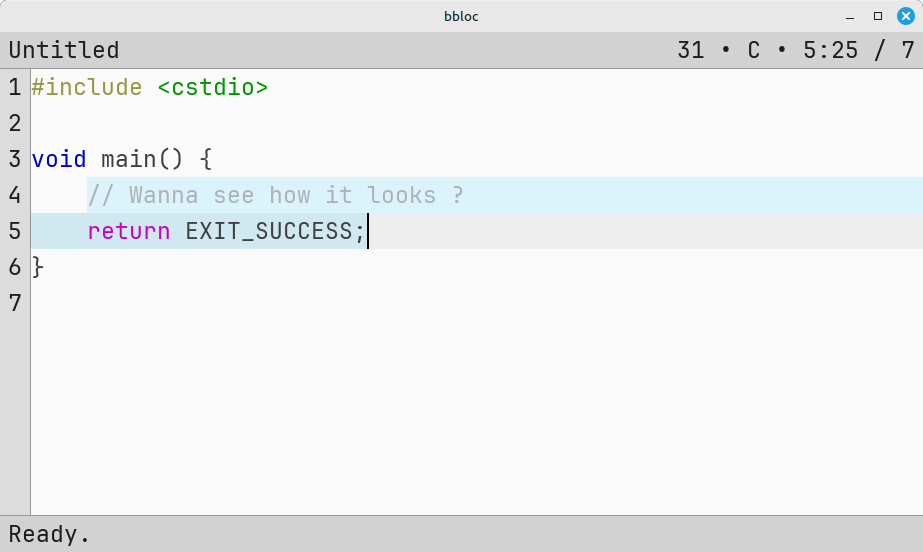
Screenshots
Changelog
v1.0-beta
First beta !
New since alpha_6:
- Nintendo Switch: the system color scheme and keyboard layout picked up at startup and an editable autoexec written
beside the NRO.
- Game controller: every button and axis binds to a command like a key, the shoulders acting as modifier layers, and the prompt is fully drivable from the pad — X opens it and confirms it, B cancels, Y cycles the completions.
- On-screen keyboard: a bottom strip driven by touch, mouse or pad, with sticky Ctrl/Shift/Alt/AltGr, hold auto-repeat and nine international layouts.
- Mouse and touch: caret placement, drag selection, wheel scrolling and draggable scrollbars; one finger types, two fingers scroll.
- Unsaved changes: tracked per buffer, shown in the info bar, and confirmed before a close or a quit can lose them.
- Safer saving: writes go through a temporary file, so a failed write cannot destroy what was already there; CRLF files keep their line endings, invalid UTF-8 is refused rather than mangled, and opening a huge file asks first.
- More languages: YAML, TOML and Markdown join C++, JSON and INI.
- Real tab stops: tabs render to the next stop instead of a fixed width, and can be typed as spaces.
- Undo: stores the text each edit replaced instead of whole-buffer snapshots.
- Manual: F1 (or _help_ command) opens the full reference of bindings, commands and settings inside the editor.
valpha_6
What's new
Added
- Multiple open buffers- — each file gets its own buffer; switch with the new buffer command (next / prev / close / with Tab completion), bound to Ctrl+Tab, Ctrl+Shift+Tab and Ctrl+W. The top bar shows the buffer position.
- Search and replace- — find next/previous and replace, with a match counter in the prompt.
- Editor scrollbars- — proportional vertical and horizontal bars, shown only when content overflows. Toggleable with the show_scrollbar cvar; horizontal mouse wheel scrolling now works too.
- goto_line command- to jump to a line.
- Open a file from the command line: bbloc [file].
- INI syntax highlighting- alongside C++ and JSON.
- Better keyboard support- — improved USB keyboard handling with support for more keyboard layouts/languages (via a custom SDL2 patch on top of devkitPro's).
Changed
- Refined command system with richer interactive feedback (confirmations, argument prompts with Tab completion).
- No more hard quad budget: rendering batches are staged CPU-side and the GPU buffer grows on demand, so the UI can never run out of quads.
- Long file names are ellipsized in the top bar.
Fixed
- Crash fixes: use-after-free when closing a buffer, clipboard paste aborting on non-UTF-8 selections, stale selection anchor running past the end of the buffer, and large font sizes aborting at startup.
- Saving is now atomic (write to a temp file, then rename) — a failed write no longer truncates the file.
- Backward search can now match on the first line, and vertical moves no longer split surrogate pairs (which could make the buffer unsaveable).
- Big performance work: linear-time multi-line paste (10k lines: 637 ms → 5.5 ms), shared tree-sitter queries across buffers, smarter highlight caching, and cheaper undo/redo and search stepping.
Don't forget, this is not yet by default:
Light and dark themes- — switch at any time with Ctrl+Shift+L (light) or Ctrl+Shift+D (dark).
valpha_5
Changes:
- Added Undo (Ctrl+Z) and Redo (Ctrl+Shift+Z) features.
- Added light ("Ctrl+Shift+L") and dark ("Ctrl+Shift+D") theme.
- Changed text storage buffer from VectorBuffer to LineBuffer.
- Reworked command flow (ex: Cut/Copy/Paste working from prompt).
- Proper syntax highlight (JSON, CPP).
- Better auto complete for path and arguments.
- General system stability improvements to enhance the user's experience.
Note:
- Light or dark theme are not by default. You must select one of theme manually.
- When auto completing a path, to enter a listed folder, type "/", then auto complete will list what is inside that folder.
Planned:
- More syntax highlight (INI, YAML, ???).
- Automatic theme selection according to user switch theme will comes in later release.
Light
Dark
valpha_4
- fix update logic (refresh only when necessary on all platforms)
- fix wrong mapping bol -> bof
- fix wrong mapping bof <-> eof
- cursor column position stick to column when possible
valpha_3
Latest build including all refactoring.
Release "0" pre-alpha.
Right now I cannot work more on it, as I need to rampup in my new work, and it will take some times. But I like this project and will update it later when free times will allow it.