App Details
A mod management tool designed specifically for the Nintendo Switch platform. The current version features a complete code rewrite and architecture redesign, with significant improvements in both functionality and stability.
Users still on version 2.x should uninstall all installed mods using the old version before upgrading to the new version.
Features:
- Modern, aesthetically pleasing interface with excellent user experience.
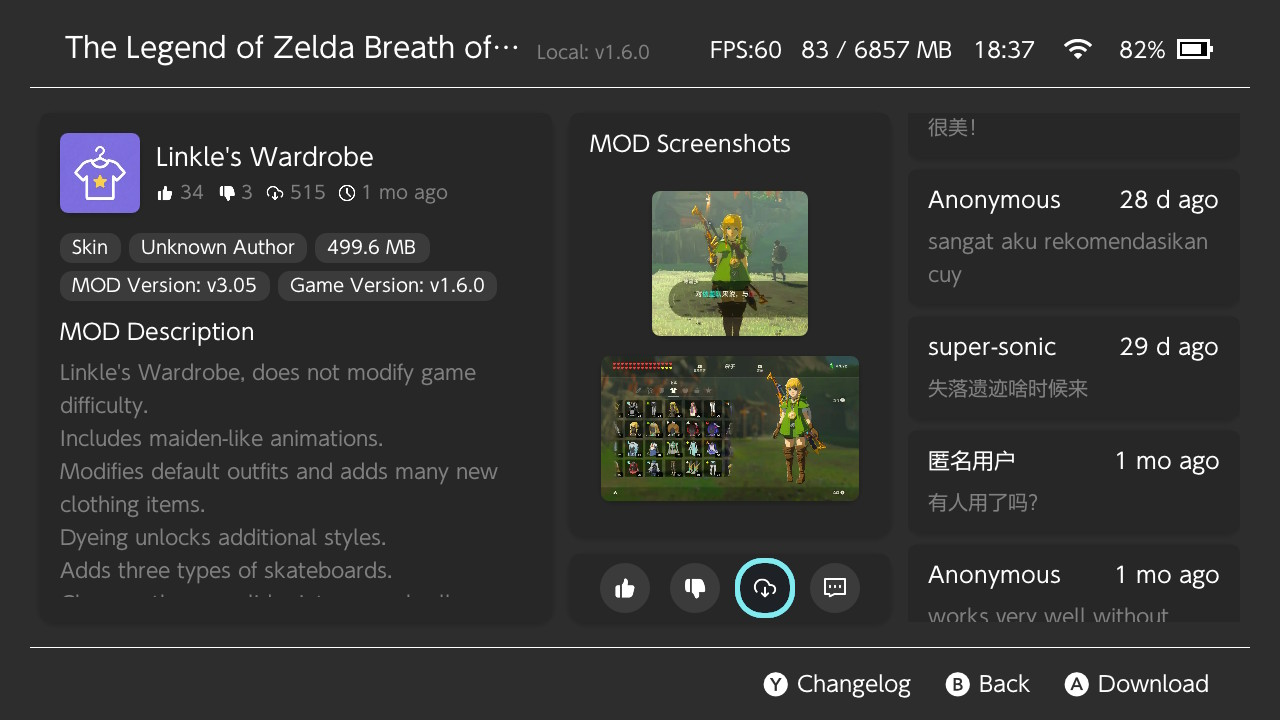
- Supports online mod browsing, downloading, and uploading via built-in mod store.
- Complete on-device mod management without manually handling the SD card.
- Game management with favorites, custom names, and manual TID entry.
- Smart detection for non-standard directory structures and file conflicts between mods.
- Automatic pchtxt to IPS patch conversion during installation.
- Supports MTP (USB) and FTP (Wi-Fi) file transfer.
- Smart search with pinyin, fuzzy matching, and initials support.
- One-click mod toggle for quick troubleshooting.
- Multi-language support (Simplified Chinese, Traditional Chinese, English).
- Light and dark themes with auto system-following.
- In-app auto update.
Screenshots
Changelog
v3.2.8
中文
- 优化怪猎崛起的模组文件的序号适配机制
- 检测到新版本时,右上角会弹出气泡通知提示更新
- 商店页面的游戏图标改为本地缓存,大幅提高加载速度
- 商店页面大幅提供搜索、筛选后的图标加载速度
- 主页的功能设置菜单重新整理分类
- 功能设置菜单中新增修复图标功能
- 功能设置菜单中新增 CPU 加速功能(建议开启)
- 商店页面新增查看上传模组的网页地址的按钮
- 商店详情页面新增查看作者链接的功能
- 修复商店模组详情页图片浏览器拉伸非标准比例图片边缘的问题
- 修复过长留言在留言板上无法正确换行的问题
- 调整部分 UI 文本
- 优化其他任务流程
EN
- Optimized serial number adaptation mechanism for Monster Hunter Rise mod files
- A bubble notification will pop up in the upper right corner when a new version is detected
- Game icons on the store page are cached locally to greatly improve loading speed
- Significantly boosted icon loading speed after searching and filtering on the store page
- Reorganized and categorized the function settings menu on the homepage
- Added an icon repair function in the function settings menu
- Added CPU acceleration function in the function settings menu (recommended to enable)
- Added a button on the store page to view the web address of uploaded mods
- Added author link viewing feature on the store mod detail page
- Fixed the issue where non-standard aspect ratio images would have stretched edges in the image viewer on the store mod detail page
- Fixed the problem that overly long comments cannot wrap lines correctly on the message board
- Adjusted partial UI texts
- Optimized other task workflows
v3.2.7
中文
- 从 v3.1.7 自更新到此版本时可能会崩溃,重启即可
- 新增对亚洲、欧洲版本的《怪物猎人:崛起》游戏模组支持
- 支持 v3.4.1-v16.0.2 版本的模组安装与卸载
- 管理器会自动修正该游戏的特殊模组文件序号
- 因该游戏规则复杂,务必遵守以下规则:
- 使用管理器前需要清除原本 SD 卡上的怪猎模组
- 使用管理器期间不得手动或使用第三方工具修改怪猎模组文件
- 如果发生异常,可使用“强制清理”功能,清除 SD 卡上所有怪猎模组文件
-
- 下载限制的提示文本现在会说明具体限制规则
- 留言昵称设置功能移动到主页的功能设置菜单
- 商店页面留言时,若未设置昵称,会弹出快捷设置窗口
- 现在卸载文件时会无脑移除 romfs_metadata.bin 文件
- 安装模组时会过滤掉以 . 开头的目录和文件
- 商店页面执行搜索后, B 键功能变更为重置搜索
- 修复内存监控功能 CPU 占用异常的问题
- 修复添加游戏后,主页卡片可能显示异常的问题
EN
- Self-update from v3.1.7 may crash. Restart to recover
- Added mod support for Asian and European versions of Monster Hunter Rise
- Supports mod install and uninstall for versions v3.4.1-v16.0.2
- The manager automatically corrects special mod file numbering for this game
- Because this game's rules are complex, please follow these rules:
- Clear existing Monster Hunter Rise mods from the SD card before using the manager
- Do not manually modify this game's mod files or use third-party tools while using the manager
- If an issue occurs, use Force Clean to remove all mod files for this game from the SD card
-
- Download limit messages now show the specific rules
- Comment nickname settings moved to the home page Settings menu
- A quick setup window appears when commenting in the store page without a nickname
- Uninstalling now always removes romfs_metadata.bin
- Mod installation now filters out files and folders starting with .
- After searching in the store page, the B button now resets the search
- Fixed abnormal CPU usage caused by memory monitoring
- Fixed possible home page card display issues after adding a game
v3.1.7
中文
- 为修复一个 BUG 紧急更新,怪猎适配将推迟到下一个版本
- 修复 v3.1.6 版本导致启动 FTP 卡死的问题
- 现在留言板匿名用户的昵称会正确跟随用户语言显示
- 检查更新日志中的时间现在会自动转换为本地时间
EN
- Emergency update to fix a bug. Monster Hunter mod support has been postponed to the next release.
- Fixed an issue introduced in v3.1.6 that could cause the FTP server to hang during startup.
- Anonymous users on the message board will now see their display name correctly localized based on the selected language.
- Timestamps in update logs are now automatically converted to the local time zone.
v3.1.6
中文
- 预告:下个版本会增加对怪猎模组的适配
- 解决了因服务器被服务商限速导致晚上时间段商店图标加载与模组下载巨慢的问题
- 感谢@huangsam04: https://github.com/huangsam04无偿提供的镜像服务器用于文件加速
- 商店模组详情页面新增 Y 按钮用于查看模组的更新记录
- 本地模组详情页面自动检查已下载的模组是否存可更新内容
- 当云端的模组文件发生更新时,在商店模组详情页面可以直接更新下载替换原来的模组
- 提高模组的下载速度,但是考虑到服务器压力,只是提高没有完全解除限制
- 复用 TCP 连接,提高商店游戏列表页面的图标加载速度
- 现在卸载模组时会强制删除 romts_metadata.bin 文件
- 修复一处导致页面标题栏偶发性闪烁的问题
- 修复商店中一处内存泄露的问题
- 修复商店搜索功能中无法使用拼音全拼进行搜索的问题
EN
- Preview: the next version will add support for Monster Hunter mods
- Fixed the issue where store icon loading and mod downloads became extremely slow during evening hours due to server bandwidth throttling by the service provider
- Thanks to @huangsam04: https://github.com/huangsam04 for generously providing a mirror server for file acceleration
- Added a Y button on the store mod details page to view the mod update history
- The local mod details page now automatically checks whether downloaded mods have available updates
- When a mod file on the cloud is updated, it can now be directly updated and downloaded from the store mod details page to replace the original mod
- Improved mod download speed, but considering server pressure, the limit has only been raised and not completely removed
- Reused TCP connections to improve icon loading speed on the store game list page
- romts_metadata.bin is now forcibly deleted when uninstalling a mod
- Fixed an issue that occasionally caused the page title bar to flicker
- Fixed a memory leak in the store
- Fixed an issue where full Pinyin search could not be used in the store search function
v3.1.5
中文
- 修复当主机已安装的游戏版本发生变化时,商店内显示的游戏版本号未能及时同步更新的问题
- 修复从模组列表页面进入商店后,已下载模组的本地数据可能异常丢失的问题(表现为模组图标显示为问号)
- 优化商店对已下载模组的检测机制(请勿直接手动删除 SD 卡 mods2 目录中的模组文件,这会导致该模组无法重新下载)
- 修复在模组列表页面新增模组后返回主页时,焦点框会短暂闪烁一次的问题
- 优化模组安装异常时的自动清理流程,触发清理时新增警告音效,同时清理阶段的进度条颜色调整为红色
- 调整下载频率限制提示文本为:“服务器资源有限,每 30 秒仅允许下载一次,敬请谅解”
- 微调部分 UI 细节与文本表现
EN
- Fixed an issue where the game version displayed in the store would not update correctly after the installed game version on the console changed
- Fixed an issue where local data for downloaded mods could be lost after entering the store from the mod list page (causing mod icons to appear as question marks)
- Improved the store's detection mechanism for downloaded mods (please do not manually delete mod files inside the SD card's mods2 directory, as doing so will still prevent the mod from being downloaded again)
- Fixed an issue where the focus box would briefly flicker after returning to the home page from the mod list page after adding a new mod
- Improved the automatic cleanup process triggered when mod installation fails, including a new warning sound effect and a red progress bar during the cleanup phase
- Updated the download rate limit message to: “Server resources are limited. Downloads are restricted to once every 30 seconds. Thank you for your understanding.”
- Minor adjustments to various UI details and text presentation
v3.1.4
中文
- 修复英文文本几处缺失的问题
- 抱歉,太忙了,之前的版本忘记测试多语言文本
EN
- Fixed several missing English text entries
- Sorry, I’ve been too busy and forgot to test the multilingual support in the previous version.
v3.1.3
中文
- 修复部分 19.x 固件(如 19.0.1)下的兼容性问题
- 修复模组安装或卸载完成后,按 B 关闭弹窗时界面未及时刷新的问题
- 修复页面切换过程中呼出菜单时,因焦点异常导致的卡死与闪退问题
EN
- Fixed compatibility issues with certain 19.x firmware versions, such as 19.0.1
- Fixed an issue where the interface would not refresh immediately after closing the mod install/uninstall completion popup with the B button
- Fixed freezes and crashes caused by focus issues when opening the menu during page transitions
v3.1.2
中文
- 主页、商店、本地添加三个页面由九宫格布局改为大卡片布局,UI 更加现代化
- 新增页面切换动画效果,部分页面之间切换时增加动画效果以提升辨识度
- 主页、商店、本地三个页面现可通过扳机键快速切换
- 商店游戏列表页面新增骨架屏加载效果
- 商店下载完成后,对话框新增返回主页或模组列表按钮
- 本地添加完成后,对话框新增返回主页按钮
- 模组列表页面与商店页面顶部标题,针对本地已安装游戏将显示游戏版本号
- 主页首次进入时的长按对话框文本已调整,增强引导性
- 主页的商店按钮已合并至 X 菜单中
- 主页的收藏菜单选项改为通过 + 号按钮直接触发
- 主页 X 菜单新增按数量排序与最近游戏排序选项
- 主页功能设置菜单新增禁用按键音效开关
- 主页 X 菜单的文本与功能选项位置已大幅调整,以优化交互与引导性
- 模组列表页面首次进入时新增长按对话框,增强引导性
- 模组列表页面已移除 + 商店按钮,并合并至 X 菜单中
- 模组列表页面 X 菜单的文本与功能选项位置已大幅调整,以优化交互与引导性
- 模组列表页面现已支持删除最后一个模组
- 模组列表页面新增通过扳机键快速访问商店页面与本地添加菜单的功能
- 本地添加页面首次进入时新增长按对话框,增强引导性
- 本地添加页面的游戏列表现仅按最近游玩顺序排序
- 关于插件页面的教程二维码现已可正常扫描
- 异步线程完全重构,增强安全性并提升页面切换流畅性
- 修复使用自定义键盘时,调用原生键盘输入非英文字符导致的崩溃问题
- 修复采用新 NACP 的游戏(如 1.9.0 版本的《塞尔达传说:旷野之息》)引起的崩溃问题
EN
- Redesigned the Home, Store, and Local Add pages from a 9-grid layout to a large card layout for a more modern UI
- Added page transition animations to improve visual distinction when switching between certain pages
- Home, Store, and Local pages can now be quickly switched using trigger buttons
- Added skeleton screen loading effect to the Store game list page
- Added "Return to Home" and "Mod List" buttons to the post-download dialog in the Store
- Added "Return to Home" button to the completion dialog in Local Add
- The top title on the Mod List and Store pages now displays the game version number for locally installed games
- Adjusted the long-press dialog text on first launch of the Home page for better guidance
- The Store button on the Home page has been merged into the X menu
- The Favorites menu option on the Home page is now triggered directly via the + button
- Added "Sort by Count" and "Sort by Recent" options to the Home page X menu
- Added a toggle to disable button sound effects in the Home page settings menu
- Significantly adjusted text and function option positions in the Home page X menu to improve interaction and guidance
- Added a long-press dialog on first entry to the Mod List page for better guidance
- Removed the + Store button from the Mod List page; it has been merged into the X menu
- Significantly adjusted text and function option positions in the Mod List page X menu to improve interaction and guidance
- The Mod List page now allows deletion of the last remaining mod
- Added quick access to the Store page and Local Add menu via trigger buttons on the Mod List page
- Added a long-press dialog on first entry to the Local Add page for better guidance
- The game list on the Local Add page is now sorted exclusively by recently played order
- The tutorial QR code on the About/Plugins page is now scannable
- Completely rebuilt asynchronous threading to enhance stability and improve page transition smoothness
- Fixed a crash caused by entering non-English characters via the native keyboard when using a custom keyboard
- Fixed a crash caused by games using the new NACP format (e.g., The Legend of Zelda: Breath of the Wild version 1.9.0)
v3.0.2
中文
- 修复移除最后一个游戏时,焦点异常的问题
- 修复首次使用本项目时,通过网络或者本地添加模组后,主页不显示游戏的问题
- 减少自动添加游戏时,SD卡游戏目录名使用TID的次数(感谢 @WE1ZARD 提供的清洗算法)
- 新增“重置状态”功能,位于主页-菜单-管理游戏-重置状态,主页用于当用户采用删除重装的方式,重装大气层整合包后,清除项目内部保存的所有状态数据,如模组的安装状态、冲突文件记录等等
EN
- Fixed an issue where the focus behaved incorrectly when removing the last game
- Fixed an issue where the homepage would not display games after adding mods via network or locally on first use of the project
- Reduced the number of times the SD card game directory name uses the TID when automatically adding games (thanks to @WE1ZARD for the cleaning algorithm)
- Added a "Reset Status" feature, located at Home → Menu → Manage Games → Reset Status. This allows users to clear all internally saved project state data, such as mod installation status and conflict records, after reinstalling the Atmosphère modpack using a delete-and-reinstall method
v3.0.0
- Major overhaul: entire project rewritten with redesigned architecture. Incompatible with 2.x — uninstall all mods using the old version before upgrading.
- Completely new UI design, improved quality.
- Redesigned interactions, enhanced user experience.
- Added online mod download feature, covering 200+ games and 380 mods in total, including hundreds of exclusive mods.
- Two theme color schemes available, freely switchable.
- Mod store content supports Simplified Chinese, Traditional Chinese, and English, auto-adapts to system language.
- Mod store supports fuzzy search by Pinyin, initials, or English.
- Supports PCHTXT files, automatically converted to IPS files during installation.
- New custom keyboard in multiple places, improving aesthetics and smoothness.
- Full touch support, can be used entirely without a controller.
- In-app self-update, no need to monitor release pages.
- Game names customizable, can be fetched from server database in three languages.
- Multi-language plugin text (Simplified Chinese, Traditional Chinese, English).
- One-click disable all mods for quick debugging.
- Added forced clean-up feature.
- Optimized multi-mod file conflict detection and resolution.
- Intelligent mod file path recognition, no longer need to follow the old mod file structure.
- Added FTP feature for wireless mod file transfer.
- Rewritten MTP feature for more stable transfer.