App Details
Supports Turbo, Remapping and Macro
Beautiful and modern UI design
The changes to the settings take effect immediately.
Record macros directly using Tesla overlay with comprehensive guidance
Optional notification popups
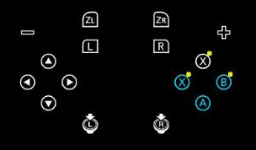
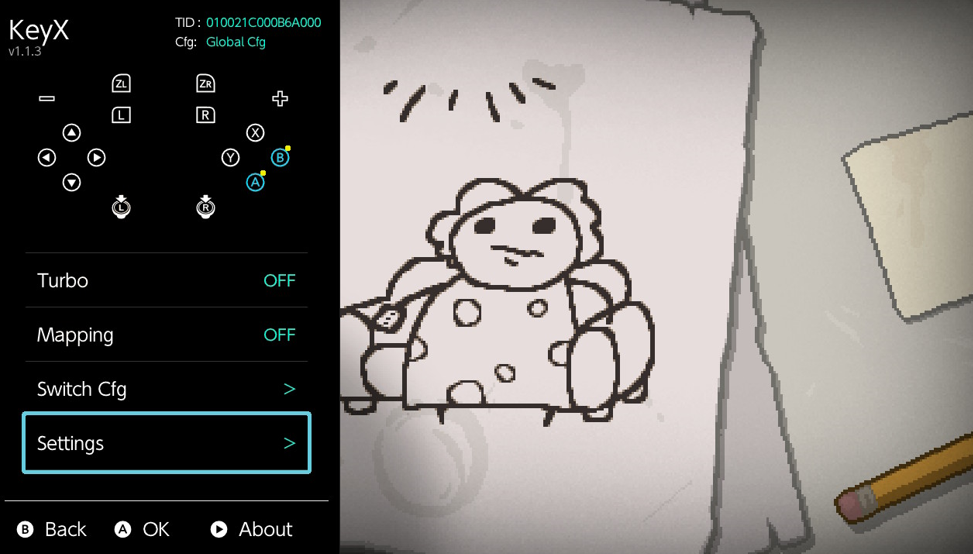
Blue icons on home page indicate remapped buttons
Yellow badges indicate turbo-enabled buttons
Red badges indicate macro-bound buttons
Screenshots
Changelog
v1.5.6
EN
- The macro store server download link has been changed to improve security
- Users on version 1.55 are advised to update to 1.56 as soon as possible, older versions will no longer be able to download
- Optimized OVL memory management, crashes caused by ovlloader being set to 4MB will no longer occur
- Fixed an issue where, when playing a macro (without joystick data), manual joystick input by the user would prevent automatic centering
- The system module memory usage has been temporarily increased to 550KB, the next version will rewrite the recording and playback algorithms to support longer macros and reduce memory usage back to around 300KB
- The default naming format for locally recorded macros has been changed to “date_hour_minute_second”
- The macro management UI has been redesigned
- The macro detail description area now supports scrolling
- After deleting a macro file, returning to the game list screen will now correctly refresh the macro count for that game
- In the OVL main interface, the configuration switch option now directly displays the currently active configuration on the right side
- A new web store option has been added to the bottom-right corner of the macro store macro list screen
- In the macro store macro detail screen, the file path text has been removed and is now replaced with the download count
- The macro store macro detail screen now detects and indicates whether the current macro is already installed
- The macro store now hides games that have server records but a macro count of 0
Thanks to @masagrator and @ppkantorski for their suggestions and guidance on memory optimization for this project.
For versions 1.4.2 and later, you can directly update by pressing + in the settings interface
The CN and EN versions differ only in the Tesla overlay title; everything else is identical.
ZH
- 宏商店的服务器下载链接,为提高安全性,进行了更换
- 1.55版本的用户请尽快更新至1.56,旧版本将无法下载
- 优化ovl内存管理,现在不会再因为ovlloader为4MB而导致崩溃
- 解决了播放宏时(无摇杆数据的宏),若用户手动输入摇杆而导致无法自动回中的问题
- 系统模块的内存占用临时提高到550KB,下版本会重写录制与播放算法,支持更长时间的宏,并将内存占用降回300KB左右
- 本地录制的宏默认命名格式修改为 “日期_时_分_秒”
- 宏的管理界面UI重新设计
- 宏的详情介绍区域现在支持滚动效果
- 删除某个宏文件后,回退到游戏列表界面时,现在会正常刷新游戏的宏数量
- ovl的主界面的切换配置选项,现在右边会直接显示当前使用的配置
- 宏商店的宏列表界面右下角新增一个网页商店选项
- 宏商店宏的详情界面删除文件路径文本,现在显示为已下载次数
- 宏商店宏的详情界面会检测并提示当前宏是否已安装
- 宏商店现在会屏蔽服务器有记录,但是宏数量为0的游戏
感谢@masagrator与@ppkantorski对本项目内存优化的建议与指导
1.4.2及以后的版本,可以直接在设置界面按+进行更新
CN版本与EN版本仅特斯拉插件标题不一样,其余完全一致
v1.5.5
EN
- Added upload functionality, available globally. The upload button is located at the bottom right of the macro details page.
- Welcome everyone to upload submissions. The server repository will be synced to GitHub Repo
- Added the ability to edit macro store description information.
- Optimized OVL memory usage.
- Updated the changelog interface to support scrolling.
- For Traditional Chinese users, the changelog display has been changed from English to Simplified Chinese.
- Fixed the issue where usage instructions were not fully displayed on the macro details page.
- Fixed a potential crash during recording caused by threading issues.
- Thanks to @do-kiss (忘忧) for providing the server and webpage.
For versions 1.4.2 and later, you can directly update by pressing + in the settings interface
The CN and EN versions differ only in the Tesla overlay title; everything else is identical.
ZH
- 增加上传功能,全球可用,上传位置位于宏的详情界面右下角
- 欢迎大家上传投稿,服务器仓库会定时同步至GITHUB
- 增加编辑宏商店描述信息的功能
- 优化ovl内存占用
- 更新界面的更新日志现在支持滚动查看
- 繁体用户的更新日志由显示英文改为简体中文
- 修复在宏详情界面的使用说明显示不完整的问题
- 修复录制的时候可能因为线程导致崩溃的问题
- 感谢@do-kiss (忘忧)提供的服务器与网页
1.4.2及以后的版本,可以直接在设置界面按+进行更新
CN版本与EN版本仅特斯拉插件标题不一样,其余完全一致
v1.5.4
EN
- Fixed the issue where macros downloaded in v1.5.3 were not visible in the macro list
- After updating, previously invisible macros may not show localized names. You can delete and re-download them to fix this
For versions 1.4.2 and later, you can directly update by pressing + in the settings interface
The CN and EN versions differ only in the Tesla overlay title; everything else is identical.
ZH
- 修复1.5.3版本下载的宏,宏列表里看不见的问题
- 更新后如果之前因为异常看不见的宏,现在看不到本地化名字,可以删掉重下
1.4.2及以后的版本,可以直接在设置界面按+进行更新
CN版本与EN版本仅特斯拉插件标题不一样,其余完全一致
v1.5.3
EN
Controller Adaptation
- Completely solved the bug where playing macros with joycon and pro controller may cause the joystick to freeze
- Added a switch in JoyCon to toggle rapid fire for the left or right controller
Macro Store
- Added macro store function, one-click download macros to switch
- In the store, you can directly see macro related introduction, such as author, usage instructions
- Accessing the store in-game will directly return the macros for that game
- Accessing the store when no game is running will directly return all installed game macros
- This is a community-based store, so the number of macros is temporarily very few
- Related servers have been set up in China, due to network restrictions, only domestic network can directly upload their own macros
- This upload function will be online in the next version
- Users in other regions can submit PR to my macro repository, or directly send macros to me
- In the future, macros on the Chinese server will also be regularly copied to the github repository
Macro Detail Interface
- Added macro metadata file, macros downloaded from the store will directly display Simplified/Traditional/English names
- Macros downloaded from the store can view related usage instructions in the macro detail interface
- The shortcut setting interface added single play, loop play, interrupt play prompt texts
- Fixed the issue when renaming macro files, duplicate file was not handled
Macro Editor
- Now when you save editor content, it will back up the original file, can be used to restore when modification goes wrong
- Rewrote editor data processing code, now processing of macro file data will be more accurate
- Editor added copy forward/backward, move forward/backward, modify joystick, delete joystick and other editing functions
- Note, modifying joystick changes the original coordinate full data joystick to virtual direction joystick, which will greatly reduce joystick precision
- Reset action and modify time functions now support batch operation
- Modify time function save button changed from A to +
- Now the action list will not be automatically merged after user modification
- Now when saving macros in editor, will not automatically add no-action at the end
- Fixed the issue of timeline total length drawing exception when total macro time changes
- Fixed the issue that undo button outside of Chinese does not automatically highlight
Macro Recording
- Now after recording is completed, the no-action frames at the end of macro data will be automatically deleted
Macro List
- Now when the number of macros in the game directory is 0, it will no longer be displayed in the list
- Added text showing the number of macros owned to the right of the game name list item
Macro Playback
- Now, when playing a macro that contains joystick data, user inputs will not be applied to the joystick
- This change is to solve the problem that playing macros may cause joystick freezing
- And macros with joystick data themselves should not receive additional user input
Others
- Added German support, thanks to @HeikesFootSlave for providing German translation text
- Now when opening ovl plugin, it will automatically detect whether there is a new version, if so, the update button will highlight to remind
- libultrahand library updated to the latest version
- Fixed curl resource leak issue
- Fixed the issue that when the network is poor in the update interface, exiting will block for a period of time
For versions 1.4.2 and later, you can directly update by pressing + in the settings interface
The CN and EN versions differ only in the Tesla overlay title; everything else is identical.
ZH
手柄适配
- 彻底解决joycon与pro手柄播放宏可能导致卡住摇杆的bug
- 针对joycon新增了选择左或者右手柄连发
宏商店
- 新增了宏商店功能,一键下载宏到switch上
- 商店中可以直接看到宏的相关介绍,如作者、使用说明
- 在游戏中访问商店,会直接返回该游戏的宏
- 未启动游戏时,访问商店会直接返回所有已安装游戏的宏
- 这是一个社区性的商店,所以暂时宏数量很少
- 中国境内已开设相关服务器,因网络限制,只有境内网络能够直接上传自己的宏
- 该上传功能将在下一个版本上线
- 其他地区的用户可以向我的宏仓库提交PR,或者直接将宏发给我
- 未来定期也会将中国服务器上的宏复制到github仓库
宏详情界面
- 新增宏的元数据文件,商店下载的宏将直接显示简体/繁体/英文的名字
- 商店下载的宏,可以在宏的详情界面查看到相关使用说明
- 设置快捷键界面增加单次播放、循环播放、打断播放的提示文本
- 修复宏文件重命名时,未处理重名文件的问题
宏编辑器
- 现在当你保存编辑器内容时,会将原文件备份一份,当修改出问题时,可用于恢复
- 重写了编辑器数据处理代码,现在对宏文件数据的处理将更精确
- 编辑器新增了向前向后复制、向前向后移动、修改摇杆、删除摇杆等编辑功能
- 注意,修改摇杆是将原本的坐标全数据摇杆,修改为虚拟方向的摇杆,这会极大的降低摇杆精度
- 重置动作与修改时间功能现在支持批量操作
- 修改时间功能的保存按钮由A修改为+
- 现在不会在用户修改后,自动合并动作列表
- 现在编辑器保存宏时,不会自动在末尾添加无动作
- 修复了当宏的总时间变更时,时间轴总长绘制异常的问题
- 修复了中文以外的撤销按钮不会自动高亮的问题
宏录制
- 现在录制完成后,会自动删除宏数据末尾的无动作帧
宏列表
- 现在当游戏目录下的宏数量为0时,该不会再显示在列表上
- 游戏名列表项右边增加所拥有宏数量的文本
宏播放
- 现在若你播放的宏中有摇杆数据,将禁止透传用户其他操作
- 此条改动是为了解决播放宏可能导致卡摇杆的问题
- 并且有摇杆数据的宏本身就不应该再接收用户额外输入
其他
- 新增德文支持,感谢@HeikesFootSlave提供的德文翻译文本
- 现在打开ovl插件时,会自动检测是否有新版本,如果有的话,更新按钮会高亮提醒
- libultrahand库更新至最新版本
- 修复curl资源泄露问题
- 修复了更新界面当网络不佳时,若退出会阻塞一段时间的问题
1.4.2及以后的版本,可以直接在设置界面按+进行更新
CN版本与EN版本仅特斯拉插件标题不一样,其余完全一致
v1.4.3
ZH
- 为修复1.4.2版本引入的崩溃问题,临时发布此版本
- 1.4.2版本因引入网络功能,如果特斯拉的ovlloader内存设置为4MB,则会引发崩溃
- 更新libultrahand库为最新版本
- 微调了脚本设置界面的UI
感谢@ppkantorski提供的修复方法
CN版本与EN版本仅特斯拉插件标题不一样,其余完全一致
EN
- To fix the crash issue introduced in version 1.4.2, this version has been released
- In version 1.4.2, the newly added network functionality can cause a crash if Tesla’s ovlloader memory is set to 4MB.
- Updated the libultrahand library to the latest version.
- Made minor UI adjustments to the script settings screen.
Thanks to @ppkantorski for providing the fix
The CN and EN versions differ only in the Tesla overlay title; everything else is identical.
v1.4.2
ZH
- 新增检查更新功能,可在设置界面按 + 键进行联网更新
- 全新的宏录制、播放、编辑算法,旧版本宏(V1)依旧兼容
- 宏(V2)录制采样率由 60 FPS 升级至 120 FPS
- 提高了宏(V2)的录制与播放精度
- 大幅压缩宏(V2)文件体积,相比 V1 版本减少 20%–50%
- 修复了宏编辑器时间轴色块绘制之间的间隙问题
CN版本与EN版本仅特斯拉插件标题不一样,其余完全一致
EN
- Added a check-for-updates feature. You can press the + button in the settings menu to update online.
- A brand-new macro recording, playback, and editing algorithm. Old version macros (V1) remain compatible.
- The macro (V2) recording sampling rate has been upgraded from 60 FPS to 120 FPS.
- Improved the recording and playback accuracy of macros (V2).
- Significantly reduced the file size of macros (V2). Reduced by 20%–50% compared to V1.
- Fixed the gaps between timeline color blocks in the macro editor.
The CN and EN versions differ only in the Tesla overlay title; everything else is identical.
v1.4.1
ZH
ovl部分新增宏编辑器
- 现代美观的UI设计
- 支持新建、删除、重置动作
- 支持批量修改动作(批量只能重置或者删除)
- 支持撤销修改(保存后无法撤销)
新增白名单功能
- 开启白名单后,可在非游戏应用(如模拟器)启用本项目的所有功能
- 白名单在ovl菜单里面直接设置即可
连发速度档位增加极速档位
- 因为底层机制限制,连发频率没法稳定,只能说能用,但是无法做到精确时间控制
优化弹窗通知文本算法
- 现在支持精准通知具体功能的状态
- 已内置多语言繁育
重新设计宏快捷键设置界面
- 更直观、便捷
优化ovl宏部分的代码结构,将UI和数据处理解耦
CN版本与EN版本仅特斯拉插件标题不一样,其余完全一致
EN
Added Macro Editor in OVL
- Modern and polished UI design
- Supports creating, deleting, and resetting actions
- Supports batch editing actions (batch only supports reset or delete)
- Supports undoing changes (cannot undo after saving)
Added Whitelist Feature
- When the whitelist is enabled, all features of this project can be used in non-game applications (such as emulators)
- The whitelist can be configured directly in the OVL menu
Added Ultra-Fast Mode for Turbo Speed
- Due to underlying limitations, the turbo frequency cannot remain stable. It works, but precise timing control is not possible
Optimized Popup Notification Text Logic
- Now supports accurate notifications for specific feature states
- Includes built-in multilingual support
Redesigned Macro Hotkey Settings Interface
- More intuitive and convenient
Optimized OVL Macro Code Structure, Decoupling UI and Data Processing
The CN and EN versions differ only in the Tesla overlay title; everything else is identical.
v1.3.1
ZH
- 修复Joycon与pro手柄,当同时开启连发与映射功能时,可能出现按键错乱的问题
- 修复映射功能当切换全局/独立配置模式时,某个情况下未能正确重置映射的问题
- 修复全局/独立配置模式状态记忆逻辑不正确的问题
- 修复后的逻辑如下:
- 1. 默认连发\默认映射功能,仅对全局配置模式有效
- 2. 当你启动游戏时,如果你的配置是全局配置,则检测默认连发\默认映射开关,若开启,则自动开启对应功能
- 3. 注意:仅在你启动游戏时,且你的配置是全局配置,这个默认开关才会生效
- 4. 当你启动游戏时,如果你的配置是独立配置,则根据上次退出这个游戏时的功能开关状态,来决定是否自启动
- 5. 如,你在A游戏保持连发功能为开启,然后退出游戏。那么当你再进入这个A游戏时,连发功能自动开启
CN版本与EN版本仅特斯拉插件标题不一样,其余完全一致
EN
- Fixed an BUG with JoyCon and Pro Controllers, where enabling both Turbo and Mapping at the same time could cause incorrect button behavior
- Fixed an BUG where the Mapping feature was not properly reset in certain cases, when switching between Global and Per-game configuration modes
- Fixed incorrect state memory logic for Global / Per-game configuration modes
- The updated logic is as follows:
- 1. The Auto Turbo and Auto Mapping switches apply only to Global configuration mode
- 2. When you launch a game, if the current configuration is Global, the system checks the Auto Turbo / Auto Mapping switches. If the switches are enabled, the corresponding features will be automatically turned on.
- 3. Note: These Auto switches only take effect when launching a game and only in Global configuration mode.
- 4. When you launch a game, if the configuration is set to Per-game, the system decides whether features should auto-start based on their toggle states when you last exited that game.
- 5. For example, if Turbo was enabled in game A when you exited it, Turbo will automatically be enabled again the next time you launch game A.
The CN and EN versions differ only in the Tesla overlay title; everything else is identical.
v1.3.0
ZH
- 调整了部分UI文本
- 宏快捷键选择列表增加摇杆按下选项
- 连发速度选择选项合并为一项
- 连发延迟启动功能,现在允许手动关闭
CN版本与EN版本仅特斯拉插件标题不一样,其余完全一致
EN
- Adjusted some UI text
- Added joystick press options to the macro hotkey selection list
- Merged the Tubro speed selection options into a single option
- The Tubro delayed start feature can now be turned off manually
The CN and EN versions differ only in the Tesla overlay title; everything else is identical.
v1.2.9
ZH
- 增加了日文的翻译文本
- 感谢@yyoossk提供
- 增加了繁体中文的翻译文本
- 感谢@david082321
CN版本与EN版本仅特斯拉插件标题不一样,其余完全一致
EN
- Added Japanese translation
- Thanks to @yyoossk for providing it
- Added Traditional Chinese
- Thanks to @david082321 for providing it
The CN and EN versions differ only in the Tesla overlay title; everything else is identical.
v1.2.8
ZH
- 重新设计宏功能快捷键设置,允许自由设置1/2/3个按键组合快捷键,例如快捷键A,快捷键ZL+A
- JOYCON的连发现在修改为仅支持右侧手柄,解决出现卡按键摇杆的问题
- 优化手柄的识别与处理,现在支持JC插在机器上,蓝牙接入PRO使用
- 优化ovl插件的页面跳转方法
- 修复ovl插件宏设置一处会导致设备崩溃的BUG
- 修复游戏焦点对部分游戏DLC或升级后的TID识别不正确的BUG
- 当前项目不同手柄各种功能的支持情况,见图

CN版本与EN版本仅特斯拉插件标题不一样,其余完全一致
EN
- Redesigned the macro hotkey configuration, allowing free customization of 1 key, 2 key, or 3 key combinations, for example hotkey A or ZL + A.
- Turbo on Joy-Con is now limited to the right Joy-Con only, fixing the issue where stuck buttons or analog sticks could occur.
- Improved controller detection and handling, now supports using the Joy-Con attached to the console together with a Bluetooth Pro Controller.
- Optimized the page navigation logic in the ovl plugin.
- Fixed a crash bug caused by a specific macro setting in the ovl plugin.
- Fixed an issue where the game focus system failed to correctly identify the TID for some DLC or titles after an update.
- Current feature support status for different controllers in the project.

The CN and EN versions differ only in the Tesla overlay title; everything else is identical.
v1.2.7
EN
- Fixed a bug where requesting the pdmqry service could cause the system service session count to overflow, leading to a crash.
- Currently, this bug has only been observed in the game Taiko no Tatsujin Rhythm Festival (01002460135A4000), causing it to crash.
- Thanks to @masagrator for providing the solution.
The CN and EN versions differ only in the Tesla overlay title; everything else is identical.
v1.2.6
EN
- Added key macro functionality
- The red badge on the home page indicates that the key has a macro bound
- Macros can be recorded directly using the Tesla plugin, and the recording guide is complete and visually refined
- Added keyboard input module, allowing file renaming through Tesla
- Both stick and button states will be recorded
- Maximum recording duration is 30 seconds
- Recording frame rate is 60 FPS
- Pressing the corresponding shortcut key plays once
- Holding the corresponding shortcut key loops playback
- Pressing the shortcut key again during playback cancels playback
Fixes
- Fixed a bug where an IPC call could cause Tesla to freeze
- Fixed an issue where using turbo and remapping simultaneously could cause key confusion
- Fixed some bugs that I already forgot what they were
Others
- Compiled with the latest libnx, it now supports HOS21
- Refactored the refresh mechanism of the ovl plugin
- Completely refactored the automatic key (turbo and macro) module in the system module
- Memory usage increased from 297 KB to 343 KB
The CN and EN versions differ only in the Tesla overlay title; everything else is identical.